
Explorer
7 days · same research workspace
$1
- 2 device allowance
- Chart research, discovery and paper simulation
- Account, updates and support
- Prepaid · no automatic renewal

A more connected way to research. Structure, liquidity, order flow and multi-timeframe context—together in one powerful Windows workspace.
Go beyond a single indicator. Discover a market, investigate the evidence, then evaluate the entry on your own terms.
Explore Crypto perpetual markets in a dedicated Windows workspace. Switch timeframes, compare structure, inspect indicator overlays and keep the selected setup in context.
Explore featureFast discovery highlights candidates before a deeper multi-timeframe evaluation. Dedicated lanes separate opportunities, early watchlists and retained research.
Explore featureDirect market-data trades and sequenced depth feed ATAS-style calculations. The ATAS VERIFIED lane keeps retained candidates distinct from fresh FLOW VERIFIED entries.
Explore feature A connected research environment · illustrative artwork
Bring higher-timeframe direction, local structure and participation into the same decision.
Compare daily, 4H and 1H context with bases, compression and liquidity.
Observe delta, CVD, footprints and sequenced depth when fresh coverage exists.
Know what is developing, what is verified and what still blocks an entry.
Each workspace has a purpose. A watchlist is not a trade instruction.
Separate GEM candidates, early watches, limit-entry research and rejected evidence. Saved cards keep the original context visible.
Explore workspaceInspect Direct market-data classified trades and two-sided depth. Missing or stale flow remains missing—not a fabricated confirmation.
Explore workspaceInvestigate sweeps, MSS, CHoCH, FVG, order blocks, breakers and SMT without counting the same event twice.
Explore workspaceCompression and liquidity provide a location to investigate. ARMED and WATCH describe development, not a promise of a pump.
Explore workspaceExplore executed trades, footprint clusters, profile nodes and liquidity changes. Always tied to the observed exchange, instrument and coverage.

Choose the duration that fits your research. The tools stay the same.
7 days · same research workspace
30 days · same research workspace
90 days · same research workspace
365 days · same research workspace
Packages differ by access duration and the displayed device allowance, not artificial tool tiers. Optional external AI/data costs are separate. Final amount and package are confirmed by the server before payment.
A guided path to your Windows workspace.
Keep your access and support in one place.
Select a prepaid full-feature package.
Access activates after payment verification.
Install the published Windows release and review the guides.
Understand the difference between a model, a watch and a verified entry.
A practical guide to WATCH, confirmation, execution and lifecycle outcomes.
Read guide ↗FIELD NOTES / 02What trades, depth and profile can—and cannot—tell you.
Read guide ↗FIELD NOTES / 03From daily context to a closed-candle retest.
Read guide ↗Clear expectations are part of a professional workflow.
No. It is Windows market-analysis software. The website sells access to the software, not cryptocurrency or an investment product.
No. WATCH, pending, retained, expired and verified states mean different things. Only current evidence and execution gates can authorize a candidate.
Not by itself. The lane supports Direct market-data data with ATAS-style calculations. An optional bridge is distinct. NexTrades is not affiliated with ATAS or any exchange.
No. Losses, failed breakouts, slippage and liquidation are possible. Confidence ranks evidence; it is not a guaranteed TP probability.
All advertised NexTrades research workspaces are in the full-feature access plan. Duration and device allowance vary by selected package. Third-party subscriptions and AI API usage are separate.
Explore selected-market charts, market discovery, setup evidence and paper simulation. Optional AI/data providers need configuration and may have separate charges. No investment returns or live-order execution are promised.
Choose a market/timeframe, inspect chart methods and check data freshness.
Trade workspace guideUse Big Movement and Radar for research. A WATCH candidate is not an entry confirmation.
Discovery guideScores express supporting evidence and conflicts—not validated winning probability.
Read setup statesPaper orders are simulated. Real fills, costs and risk may differ.
Paper simulation guideWindows 10/11 x64 and an internet connection are required. First activation is online. Check release-specific compatibility; do not disable Windows protections.
Owner-supplied captures from 13 October 2026—not illustrative mockups. Research states and paper simulation are shown as captured.
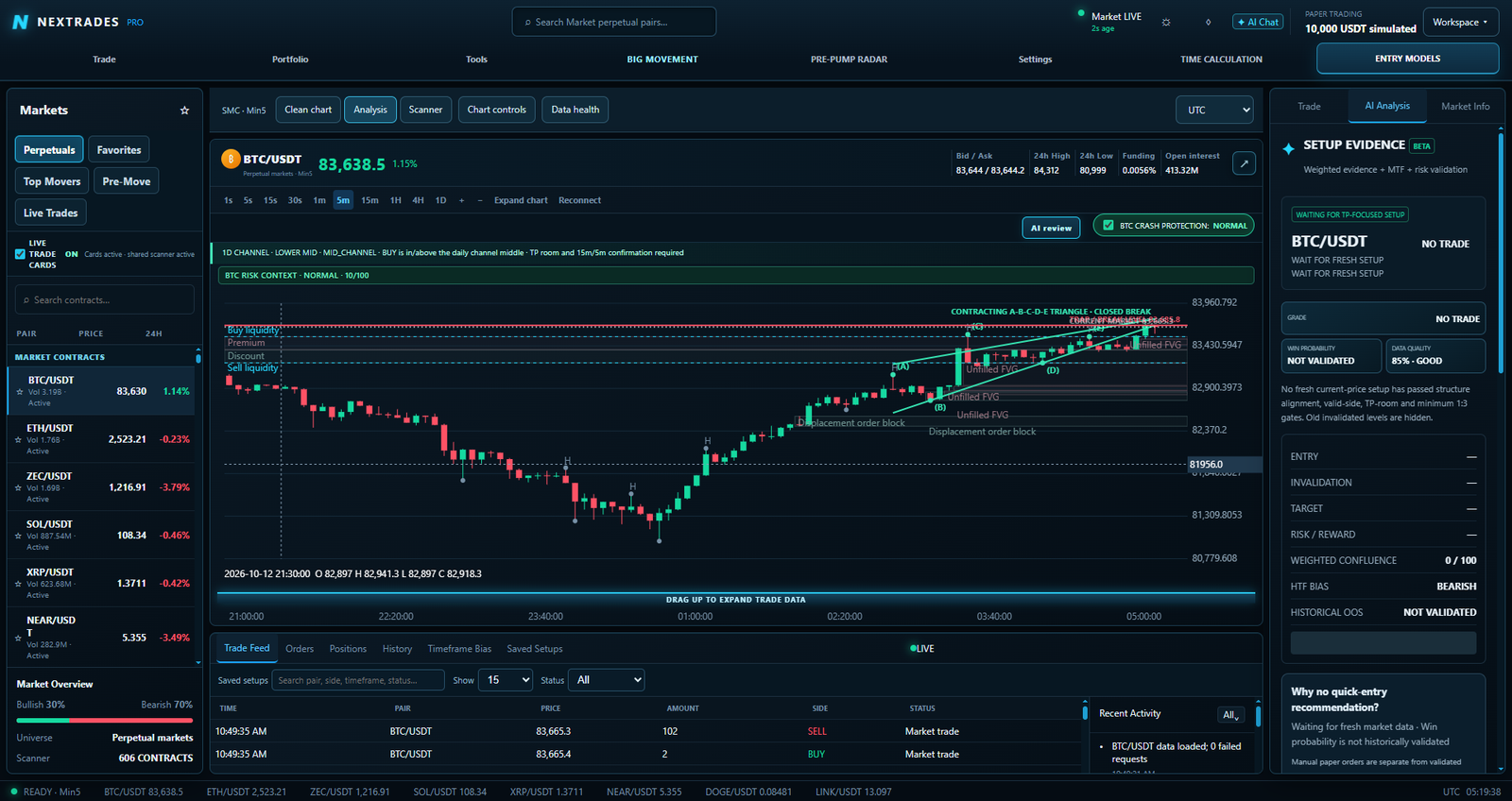
Selected-market chart with NO TRADE and unvalidated win-probability labels.
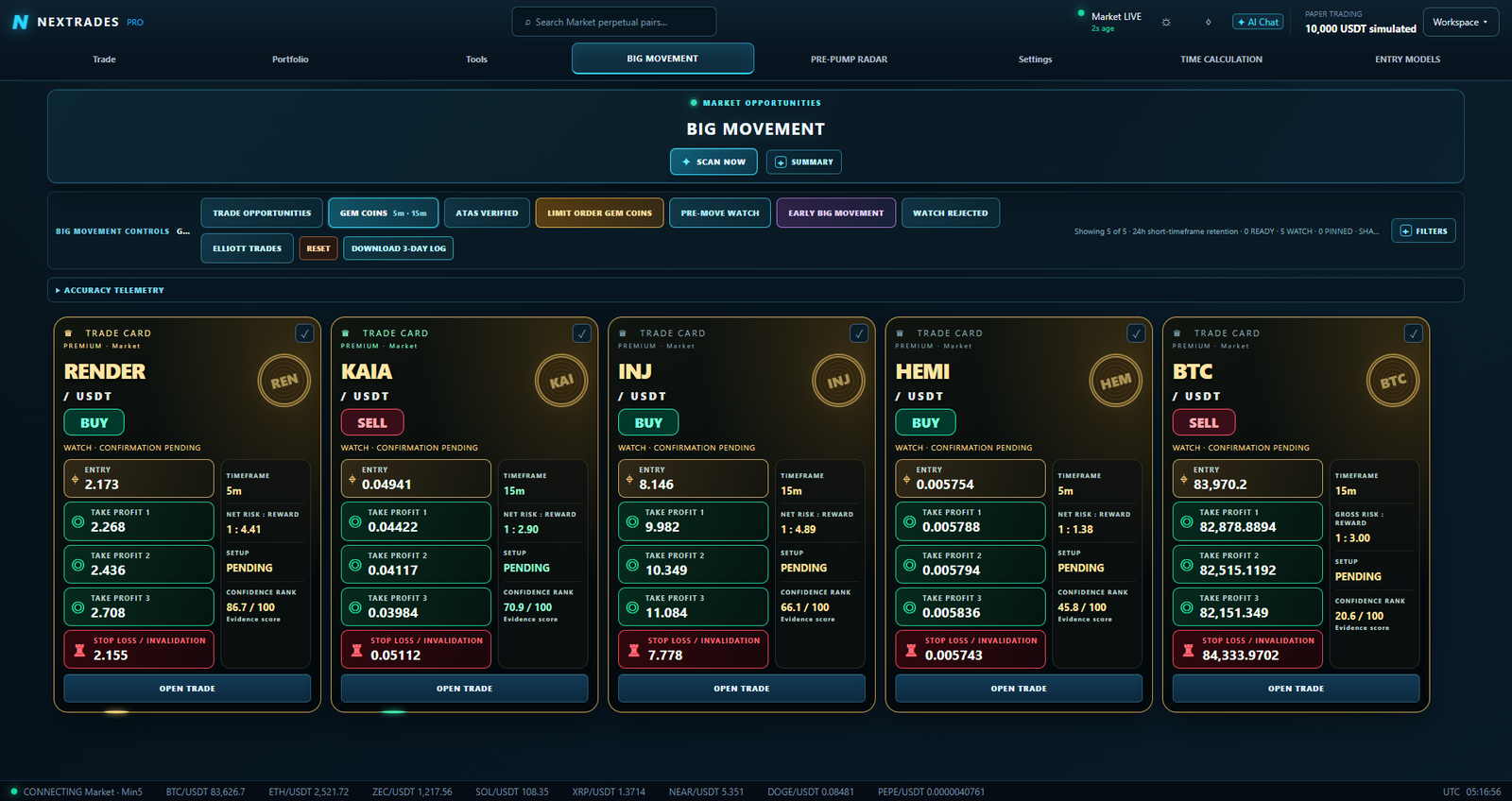
WATCH / confirmation pending candidates, not confirmed trade entries.